

 0
0


Image Courtesy of SolidPrint
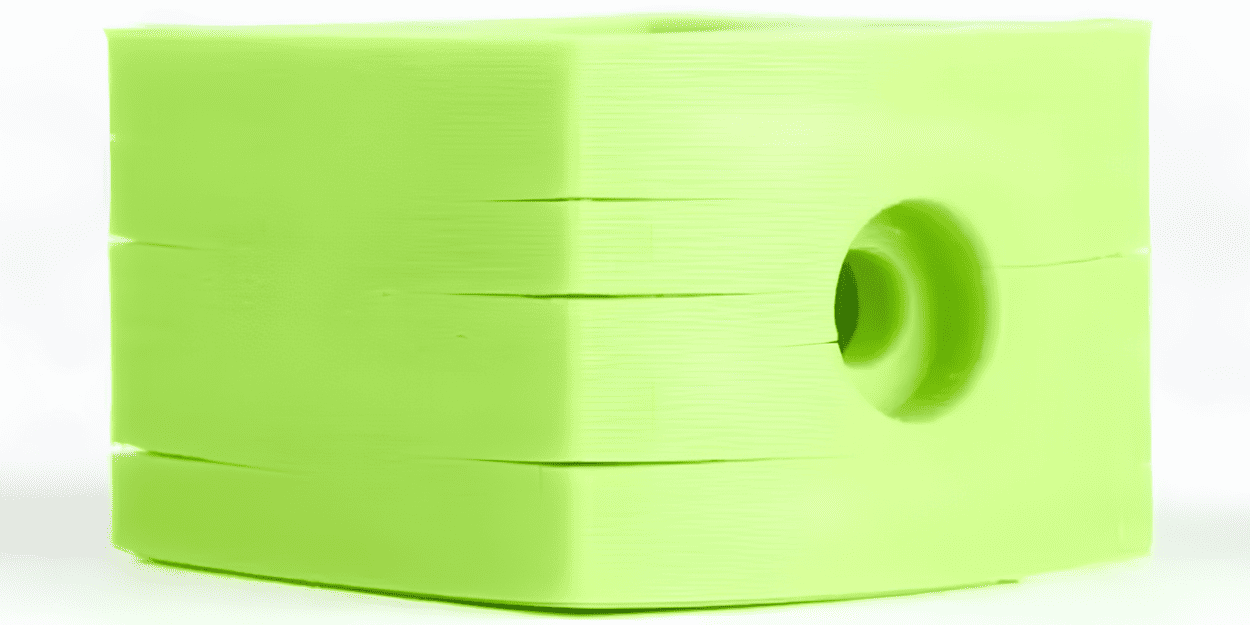
Why Layers Separate
At its core, layer delamination is a bonding problem. Each extruded bead must fuse with the layer below so polymer chains can diffuse and entangle across the interface. When that bonding is weak, the part behaves like a stack of pancakes held together loosely and easy to peel apart.
Main Causes
• Insufficient thermal contact. If a newly deposited layer cools too quickly or the nozzle temperature is too low, polymer chains don’t have time/energy to interdiffuse and form strong bonds.
• Large temperature gradients. As printed plastic cools, it shrinks. Uneven cooling creates internal stresses that pull layers apart, especially in large flat areas or thin walls.
• Moisture and contamination. Some polymers absorb moisture; water causes bubbling during extrusion and produces weaker interlayer adhesion. Oils, dust or degraded filament also reduce bonding.
• Mechanical and geometric stress concentration. Sharp corners, thin cross sections, and loads perpendicular to the layer plane concentrate stress at interfaces and accelerate delamination.
• Poor extrusion or layer deposition. Under-extrusion, clogged nozzles, or inconsistent filament diameter cause gaps and weak spots that propagate into cracks.
Filament Handling
Good prints start with good filament.
• Buy quality filament. Low-cost, poorly manufactured spools vary in diameter and contain inclusions that cause under-extrusion and weak layers. Reputable brands typically yield more consistent bonding.
• Store filaments dry and sealed. Use zip bags with desiccant or a filament dry box. Hygroscopic materials should be kept sealed when not in use.
• Dry when necessary. If filament clicks, pops, or prints look foamy, dry it. Follow manufacturer guidance; typical home-drying ranges are 40–70°C for several hours, depending on material and humidity.
• Rotate spools and inspect visually. Discolored, brittle, or powdery filament probably absorbed moisture or degraded; replace it.
• Keep the feed path clean. Dust or lubricant on the filament can transfer into the hotend and reduce adhesion.
Printer Setup
A tuned printer gives consistent, well-bonded layers.
• Calibrate extrusion. Set correct E-steps/mm and use extrusion multiplier or flow settings to avoid under- or over-extrusion. Slight under-extrusion causes gaps between lines, which weaken interfaces.
• Level the bed and set the first layer correctly. A good first layer establishes contact and thermal behavior for the rest of the print. Too high creates gaps; too low causes squish that can trap stresses.
• Use the right nozzle and keep it clean. A partially clogged nozzle changes bead shape and bonding. Match nozzle diameter and layer height: avoid layer heights greater than 75% of nozzle diameter for optimal layer contact.
• Heated bed and enclosure. A heated bed reduces warping. Enclosures keep ambient temperature steady and slow cooling; this is critical for ABS, nylon, and large parts.
• Stable motion and low vibration. Loose belts, wobbly frames, or poorly secured parts can introduce micro-separations between layers during printing. Tighten what needs tightening.
• Cooling fan control. Many materials benefit from reduced or staged cooling. Uncontrolled rapid cooling is a common cause of delamination.
Methods to Increase Interlayer Bonding
1. Raise nozzle temperature within safe limits. Higher extrusion temperatures increase chain mobility and diffusion between layers. Move toward the upper end of the filament’s recommended range, but avoid temperatures that cause stringing, discoloration, or thermal decomposition.
2. Lower cooling and increase layer time. Reduce part cooling fans and/or set minimum layer times so consecutive layers remain warm long enough to bond.
3. Slow down print speed. Slower speeds give more time for heat transfer between layers and generally improve bond strength.
4. Use thicker extrusion widths and more perimeters. A slightly larger extrusion width and more shells create more material contact and help distribute loads away from interface planes.
5. Reduce layer height. Thinner layers expose more surface area between layers and typically bond better because each layer compresses and wets the previous one more effectively.
6. Slight over-extrusion carefully. A small extrusion multiplier increase can improve line filling and bonding. Watch for bulging or dimensional issues.
7. Infill overlap and pattern. Increase the shell-to-infill overlap and choose infill patterns that tie well into perimeters.
8. Adaptive temperature or hotend dwell tricks. Some advanced printers or firmwares allow a brief high-temperature dwell between layers to promote bonding; use with caution and material knowledge.
Design Strategies
Good design reduces the mechanical drivers of delamination.
• Orient parts to load along layers, not across them. Whenever possible, orient features so tensile or bending loads are parallel to the layer plane rather than perpendicular.
• Avoid sharp internal corners and stress risers. Fillets and chamfers distribute stress across the material instead of concentrating it at a single layer line.
• Increase wall thickness where loads are expected. More material provides redundancy; the failure will require breaking more bonds.
• Add ribs, gussets, or continuous features. These spread loads and reduce the stress that would otherwise act on a single-layer interface.
• Split long, thin walls. Where large flat spans would warp and pull on layers, add ribs or cutouts to reduce the unsupported area.
• Use mechanical reinforcement if necessary. Steel inserts, pins, or brazed/epoxy joints can restore strength for critical components.
FAQs
Q: Will increasing nozzle temperature always fix delamination?
A: Not always. Higher temperature helps polymer diffusion, but if the problem is moisture, poor filament, mechanical stress, or rapid ambient cooling, temperature alone may not solve it.
Q: How much should I dry filament, and at what temperature?
A: Follow the filament spec. Typical home-drying for hygroscopic materials ranges from 40–70°C for 4–12 hours, depending on spool size and humidity. PLA is less sensitive; nylon and PETG need more care.
Q: Does layer height matter?
A: Yes. Lower layer heights generally produce stronger interlayer bonds because each layer better wets and compresses the layer beneath. But print time increases.
Q: Is annealing a good fix for delamination?
A: Annealing can relieve stresses and increase crystallinity for some materials. It often changes dimensions, so plan for post-anneal fit adjustments and follow material-specific annealing profiles.
Q: What quick tests can I run to check bond strength?
A: Print small single-wall tensile bars, 20×20×5 mm compression cubes, or a 90° peel test sample. Load them manually to compare before/after tuning.


